
Start with the job
Start with the job
A construction drawing helps you answer a question about the job: where something goes, how large it is or how its parts fit together. In this course, you will learn to choose the right drawing, follow its references and read it alongside the specification. You will use those skills to explain project requirements and recognise when you need clarification.
Your trainer checks the prerequisite CPCCWHS2001 Apply WHS requirements, policies and procedures in the construction industry. Site entry also follows the site's induction and safety arrangements. Completing an online lesson does not authorise entry, construction work or excavation.
The course follows a consistent pattern: read the explanation, work through a situation, then prepare your own response to the related task. Help opens the exact reading section. In an activated learner record, saved work, submitted attempts and assessor findings are separate records. Checking an answer provides teaching support; it does not submit it or mark competency.
Read assessor feedback before a re-attempt and address the identified gaps in your own words. Earlier submitted attempts remain in history. A final unit outcome and any Statement of Attainment follow authorised staff review and the existing award and certificate checks; finishing the reading does not issue a certificate.
 Open full-size illustration
About this illustration and its limits
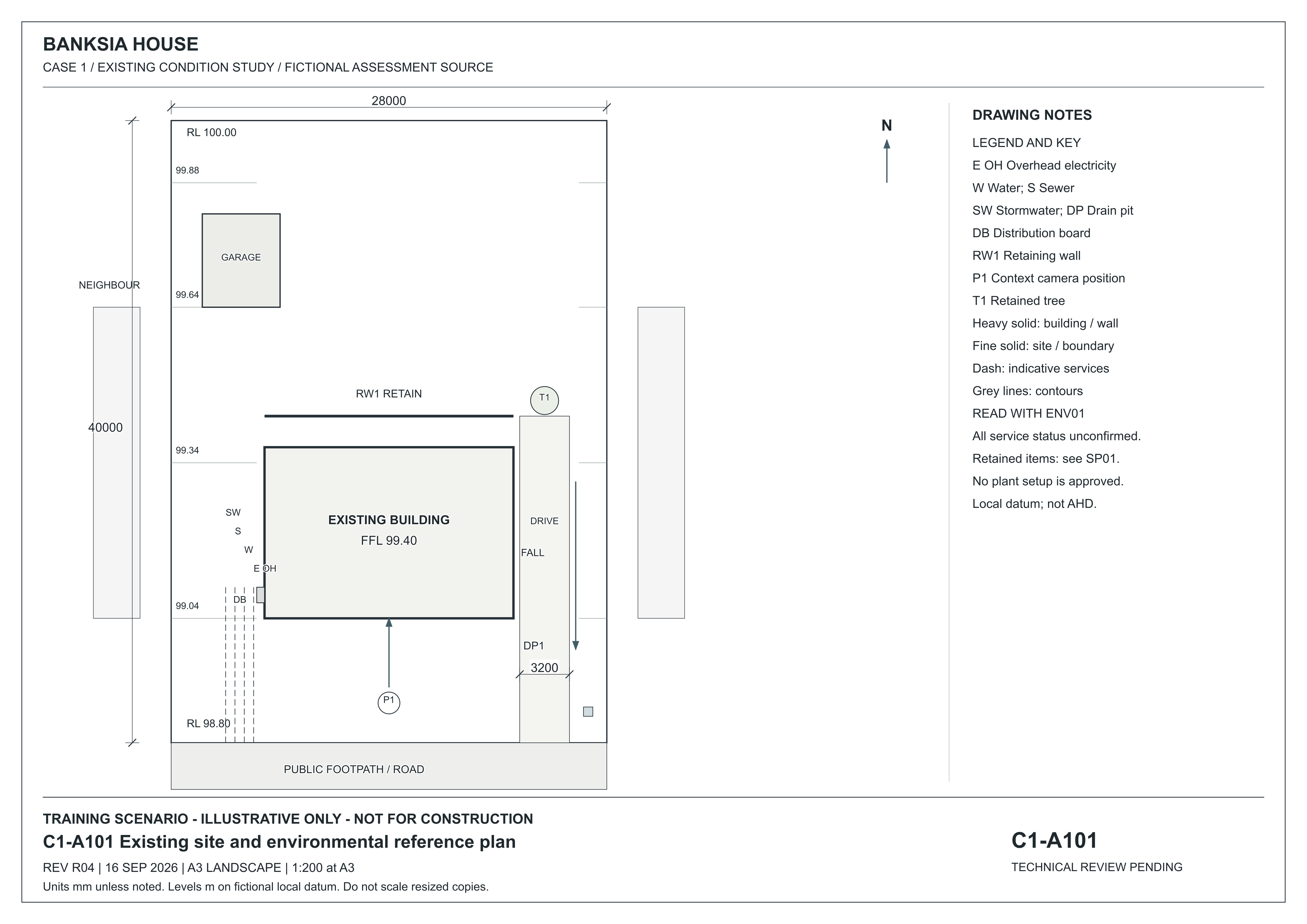
A101 places the main building and detached garage inside the lot. DP1 is a drain pit at the low southern frontage; T1 is the eastern retained tree and RW1 the rear garden wall. The legend identifies DB as distribution board and the service line abbreviations. Services are indicative and unconfirmed. Read ENV01 for environmental instructions and SP01 for project requirements.
Existing-condition drawing for a fictional training project, R04, 16 September 2026. Not for construction. Use written dimensions; do not scale a resized screen image. Open the full-size drawing to read the title block and legend.
Source: Onshift · Banksia and Riverbend teaching drawings and initial records
Start with a real document-reading problem
Distinguish a teaching drawing, a project instruction and evidence of your own work.
Study the drawing
Locate a feature on the full sheet, then read its enlarged detail.
C1-A101 — revision R04 · 16 September 2026
Fictional existing-condition drawing. Not for construction. Dimensions are in millimetres unless noted; levels are in metres on a fictional local datum. Use written dimensions, not screen measurements.
Start here: what is a title block? It is the drawing’s identity panel. On this sheet it is the band along the bottom. The highlighted part contains the drawing number and name, revision, issue date, paper size and printed scale. Use those details to check which drawing you have before interpreting the work. The enlarged view below makes that text readable.
The numbered markers point to features on the full sheet. Hover or focus a marker to locate it. Tap, click or press Enter to open its explanation and enlarged detail. The named buttons above do the same thing.
1. Title block, revision and date — Bottom band of the sheet: read the project and drawing identity before the revision, date and scale statement.
Open original full-size C1-A101 R04
Enlarged detail: Title block, revision and date
Swipe to explore the enlarged detail, or focus it and use the arrow keys. The full sheet above keeps its position in context.
Read this detail in text
- Issue
- REV R04, dated 16 SEP 2026. Match the sheet identity as well as the revision when moving between drawings.
- Purpose
- Training scenario — illustrative only — not for construction.
- Measurement
- The printed scale applies to its stated A3 sheet size. A resized screen view changes that relationship; read the written dimensions.
Narrated lesson
AI narration · transcript available. Pause to inspect the drawing when prompted. Your listening position is saved on this device; it is not assessment evidence.
Read the lesson transcript
Imagine arriving with two drawings that look almost identical. One is the issued drawing. The other is an old study. Knowing which one to use matters before you read a single dimension. In this course, you will learn to identify a document, follow its references and explain what the job requires. We will practise reading the Banksia House and Riverbend drawings. Their labels matter: these are fictional existing-condition studies. Later, your assessment will use a coordinated proposed construction project. Listening can help you understand the method. Reading a drawing and demonstrating a task still require you to stop and practise. When you can view the screen, open the Banksia site drawing and find its title block. Read its purpose, revision and status. Then explain, in your own words, what this sheet can tell you and what it cannot. Use the explanation after you have tried. Your assessor reviews your own evidence; finishing a recording does not make an assessment decision.
Audio guide: From your first saved answer to an assessor decision
AI narration with a matching transcript. Your listening position is saved on this device; listening is not assessment evidence.
Read the audio guide transcript
Begin with the course entry check. Before assessed work starts, Matthew Hardy must verify your prerequisite evidence for C P C C W H S two zero zero one. Use the Matthew Hardy contact link shown in the course to arrange that review. Ask how to provide your Statement of Attainment or U S I transcript. Do not send your login details. A white card alone does not establish completion of that unit.
Work in your activated learner record. The public preview and practice response boxes do not save assessment answers. In the learner record, write your own answer and wait for the saved confirmation before leaving. If saving fails, keep the page open and follow the recovery message. A saved draft is available for you to continue. It has not been sent to an assessor. Checking an answer provides learning support; it does not make a competency decision.
For the project portfolio, read the issued project pack and send your own request for clarification through the task's arrangements area. An R F I is a request for information. Identify the sources and the information you need. Wait for the assessor's recorded response, then retain and use it in your project record. A request alone does not complete this stage.
For the observed task, request a practical booking. Wait for the issued time, location, contact, personal protective equipment and entry briefing before attending. The assessor observes your actions and records the required evidence. An online explanation does not replace that practical activity.
When the task's required arrangements and evidence are complete, use Send to assessor and wait for confirmation. Read the published feedback. If another attempt is required, your assessor must explicitly release it before you can send revised work. Follow the feedback and any new arrangements. Earlier submitted attempts remain in the record.
A human assessor considers the combined evidence and records the final unit decision. If you are deemed competent and the required identity, fee, award and issuing checks are satisfied, authorised staff can issue a Statement of Attainment. Completing lessons or pressing submit does not issue that document.
Find it in the source
Open the Banksia site drawing. Read its heading and the status beneath the title block before looking at the building.
Try it yourself
What can this drawing help you learn, and what does its status prevent you from assuming?
Practice only. Your notes clear when you change topics or leave this page. They are not saved or submitted as assessment evidence.
Start with the job
Read, practise and prepare your evidence in the same course journey.