
Check the current issue
Check the current issue
Check the title panel and revision information against the project's issue register or document-control process. The latest date on your device is not proof that a file is the current authorised issue.
A revision cloud draws attention to a change. Read the linked revision identifier, description and issue information to understand which change is being communicated. Compare related plans, elevations, sections and schedules where the change affects more than one view.
If records conflict, document the location of the problem, the sources and the clarification needed. Send it to the person authorised to resolve it. Keep the response with the project record and work from the confirmed information.
Worked example: Example RFI: 'Window W03 is located differently on the floor plan and elevation. Please confirm the required location and the current coordinated drawing issue before the work proceeds.' Include the actual sheet numbers and revisions when using this on a project.
Source reading — Banksia SI01 Revision instruction R04: Superseded R03 register entry: drive 2.8 m. Controlled R04 entry: drive 3.2 m. Treat this as a documentary correction, not a road widening. Report affected route/plant assumptions.
 Open full-size illustration
About this illustration and its limits
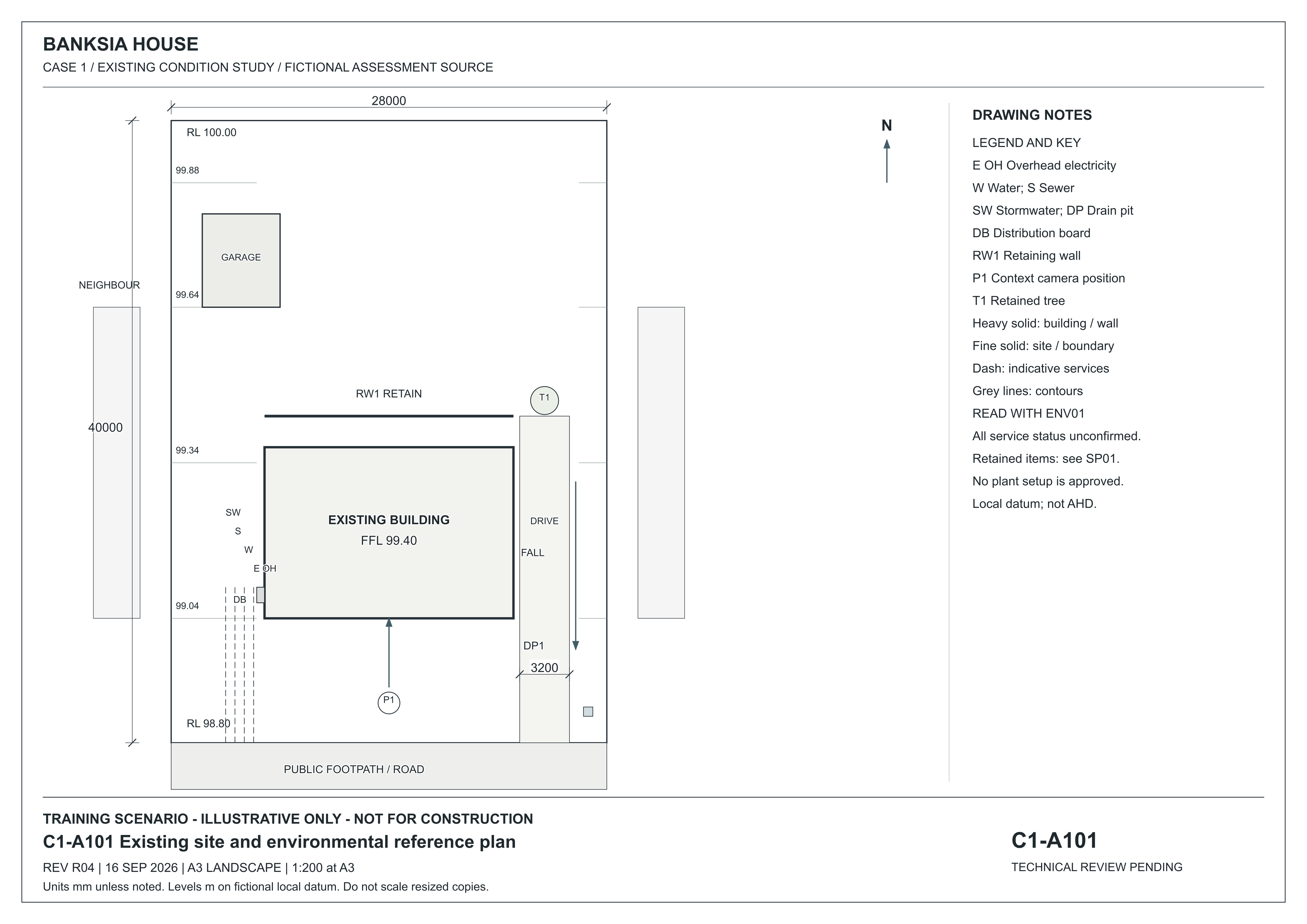
A101 places the main building and detached garage inside the lot. DP1 is a drain pit at the low southern frontage; T1 is the eastern retained tree and RW1 the rear garden wall. The legend identifies DB as distribution board and the service line abbreviations. Services are indicative and unconfirmed. Read ENV01 for environmental instructions and SP01 for project requirements.
Existing-condition drawing for a fictional training project, R04, 16 September 2026. Not for construction. Use written dimensions; do not scale a resized screen image. Open the full-size drawing to read the title block and legend.
Source: Onshift · Banksia and Riverbend teaching drawings and initial records
Resolve the driveway discrepancy
Compare a drawing with a revision instruction and record the effect of a correction.
Study the drawing
Locate a feature on the full sheet, then read its enlarged detail.
C1-A101 — revision R04 · 16 September 2026
Fictional existing-condition drawing. Not for construction. Dimensions are in millimetres unless noted; levels are in metres on a fictional local datum. Use written dimensions, not screen measurements.
The numbered markers point to features on the full sheet. Hover or focus a marker to locate it. Tap, click or press Enter to open its explanation and enlarged detail. The named buttons above do the same thing.
Choose a numbered marker or a named feature to locate it on the sheet.
Open original full-size C1-A101 R04
Read the sheet in text
A101 places the main building and detached garage inside the lot. DP1 is a drain pit at the low southern frontage; T1 is the eastern retained tree and RW1 the rear garden wall. The legend identifies DB as distribution board and the service line abbreviations. Services are indicative and unconfirmed. Read ENV01 for environmental instructions and SP01 for project requirements.
Narrated lesson
AI narration · transcript available. Pause to inspect the drawing when prompted. Your listening position is saved on this device; it is not assessment evidence.
Read the lesson transcript
A revision is more than a newer filename. It is a change you must connect to the records used for the job. Here is a teaching problem from Banksia. The earlier register entry says the driveway is two point eight metres wide. The controlled R zero four instruction says three point two metres. It describes a documentary correction, not a wider road. When you can see the drawing, open C one A one zero one, revision R zero four. Find the written dimension, three thousand two hundred millimetres. That is three point two metres. Pause now. Explain which records agree, which note conflicts and what you would report. A useful clarification identifies the affected documents, the difference and the assumptions that need review. Keep the authorised response with the project record. Do not simply overwrite the old note and lose the history. In another project, use its own issue register and responsible person; do not assume that the newest attachment is approved.
Worked example: Organise project files
Look at the document-organisation example. Then use the lesson's issue-register process to explain how you confirm the current authorised drawing.
Optional example hosted on TikTok. You can also use the lesson explanation and drawings.
Find it in the source
Read C1-A101's revision, date and written driveway dimension. Teaching extract from C1-records, SI01: the superseded R03 register entry was 2.8 m; controlled R04 is 3.2 m. SI01 calls this a documentary correction, not road widening.
Try it yourself
An old planning note still says 2.8 m. What conflicts, what agrees with the drawing, and what should your clarification record identify?
Practice only. Your notes clear when you change topics or leave this page. They are not saved or submitted as assessment evidence.
Check the current issue
Use the reading above, then apply it to the situation and task below.
Resolve conflicting project information
Work within the authority and safety arrangements for your role.
A newly emailed drawing conflicts with a sheet in the project's issued set.
Resolve conflicting project information
Situation
A newly emailed drawing conflicts with a sheet in the project's issued set.
Answer in your own words using the question and sources. This written explanation is separate from the project portfolio and observed practical task.
Explain how you check title panels, revisions and amendments on drawings and specifications. Describe what you would record, who you would ask and how you would keep the confirmed information with the project record.
Type your answer, or use your device's dictation to speak it into this box. Check the text before submitting.
Help with this answer (optional)
Arrival time alone does not prove an authorised issue. Identify the records you compare and the clarification needed.
Check my answer (preview only — disabled). Show example layout
Synthetic example — layout demonstration only. Not AI output, not stored, not evidence.
What is clear
- Example layout only: the response identifies the project records being compared.
What to develop
- Example layout only: explain how you establish the authorised issue and report the inconsistency.
A question to think about
Which record would confirm the current authorised issue?
Read more in the Field Book
Teaching feedback only. It is not a mark or a result; your assessor decides the outcome.
Optional help and learning for this task
Read the matching fieldbook section
Task wording as issued
Explain how you check title panels, revisions and amendments on drawings and specifications. Describe what you would record, who you would ask and how you would keep the confirmed information with the project record.
Preview only — disabled. A learner sends from the evidence page.
What to submit
Your own written explanation.