
Read the site
Before entering a site, follow its entry arrangements and select and use the required personal protective equipment. Reading a plan online does not demonstrate that you can use the required PPE on site.
Read the site
Before entering a site, follow its entry arrangements and select and use the required personal protective equipment. Reading a plan online does not demonstrate that you can use the required PPE on site.
To orientate the plan, identify its north arrow and reliable reference features. Align the plan with the site, then connect the boundary, building position, access and other nominated features with what you can identify at the site.
Use the site plan and associated drawings to locate services and key features. Report missing, unclear or inconsistent information. A service drawn on a plan does not by itself establish the exact field location or permission to excavate.
Worked example: In a supervised training scenario, identify the street frontage and a confirmed boundary reference. Use these with the north arrow to orientate the plan. Then locate the nominated features. If the apparent site arrangement does not match the drawing, stop and clarify it.
Turn the plan to match the place
Explain orientation and recognise the difference between a plan location and a verified site condition.
Study the drawing
Locate a feature on the full sheet, then read its enlarged detail.
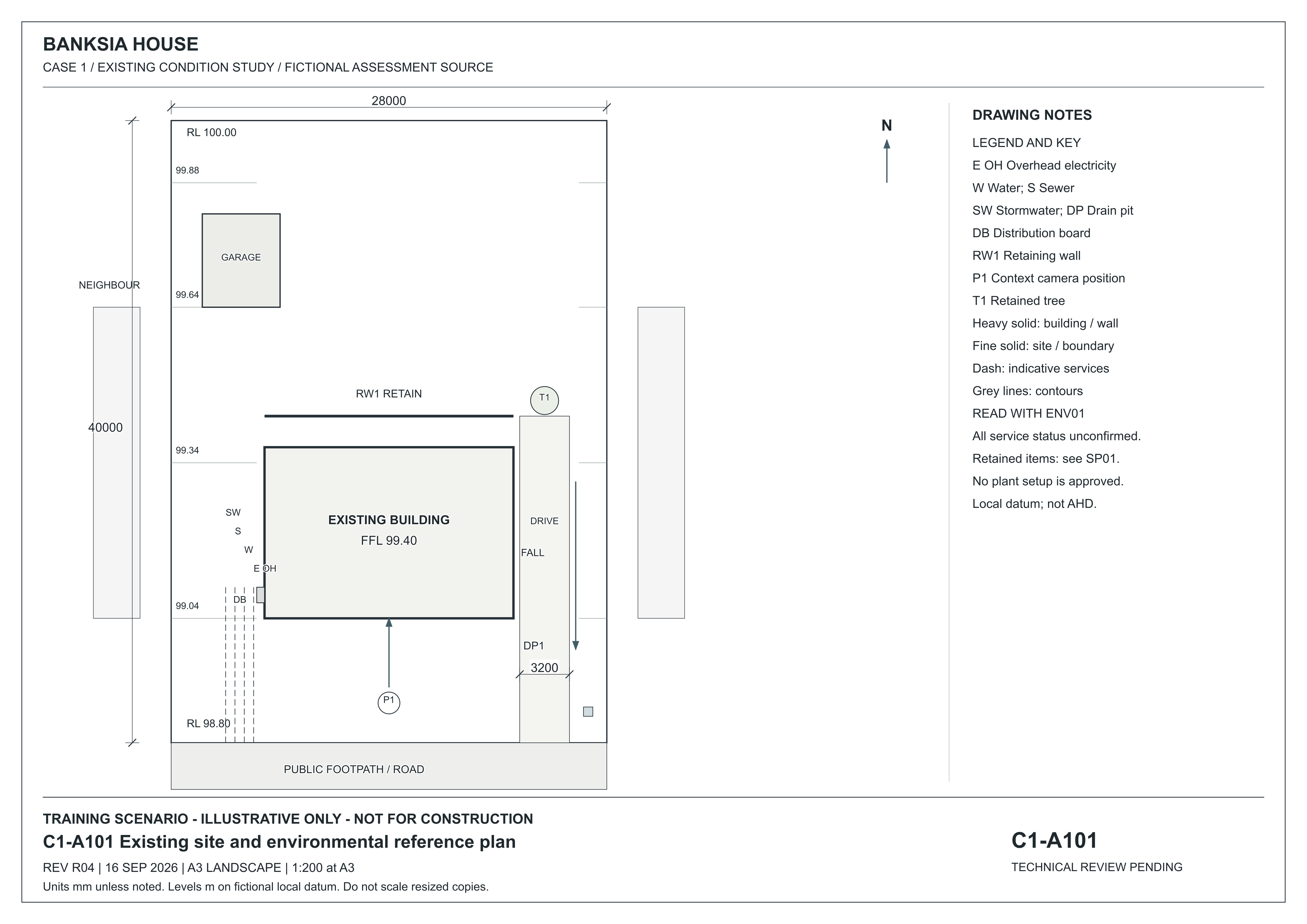
C1-A101 — revision R04 · 16 September 2026
Fictional existing-condition drawing. Not for construction. Dimensions are in millimetres unless noted; levels are in metres on a fictional local datum. Use written dimensions, not screen measurements.
The numbered markers point to features on the full sheet. Hover or focus a marker to locate it. Tap, click or press Enter to open its explanation and enlarged detail. The named buttons above do the same thing.
Choose a numbered marker or a named feature to locate it on the sheet.
Open original full-size C1-A101 R04
Read the sheet in text
A101 places the main building and detached garage inside the lot. DP1 is a drain pit at the low southern frontage; T1 is the eastern retained tree and RW1 the rear garden wall. The legend identifies DB as distribution board and the service line abbreviations. Services are indicative and unconfirmed. Read ENV01 for environmental instructions and SP01 for project requirements.
Read a proposed building
SO01 adds a small proposed site office to the fictional BP-01 yard. Follow the same building through its plans, elevations, section and schedules.
Fictional teaching supplement · R01, 17 October 2026. Use the edition assigned by your assessor. BP-01 remains the assessed path project; these sources do not add a new practical task or authorise construction.
SO-A101 — Proposed site-office location · A3 at 1:100
Use the site plan to locate the proposed office in relation to boundaries, the path and retained yard features.
The numbered markers point to features on the full sheet. Hover or focus a marker to locate it. Tap, click or press Enter to open its explanation and enlarged detail. The named buttons above do the same thing.
Choose a numbered marker or a named feature to locate it on the sheet.
Open SO-A101 with complete text equivalent · Open original full-size SO-A101
Reading limit: A plotted position does not establish service clearance, a usable entrance or permission to build.
Door, window and finish schedules · Specification · Issue register
Download all four A3 drawings (PDF) · Study guide and worked examples
Narrated lesson
AI narration · transcript available. Pause to inspect the drawing when prompted. Your listening position is saved on this device; it is not assessment evidence.
Read the lesson transcript
A drawing can be rotated to fit a sheet. The page edge is not a compass. When you can look at the two teaching plans, find their north arrows. Banksia's site plan has north at the top. Riverbend's floor plan points north to the right. If you keep both pages upright and assume the top is north, one interpretation will be wrong. On a work site, begin with the entry instructions and required protective equipment. Use reliable reference points to relate the plan to the physical area. Locate the nominated boundaries, features and service information within the authorised task. A service line on a plan does not prove its exact underground position or its isolation. Pause and explain how you would align Banksia's southern frontage with a work area. This is preparation. Your practical assessment requires the actual actions in an arranged workplace or close simulation, observed by your assessor.
Worked example: Site-plan basics
Identify the orientation and reference features shown in the site-plan example. Then compare the north arrow and frontage on the supplied teaching plan.
Optional example hosted on TikTok. You can also use the lesson explanation and drawings.
Find it in the source
Find north on both sheets. Banksia A101 has north up; Riverbend S201 has north toward the right of the page.
Try it yourself
Which direction is Banksia's public frontage? Would keeping every page upright correctly orientate both plans?
Practice only. Your notes clear when you change topics or leave this page. They are not saved or submitted as assessment evidence.
Banksia · site and environmental reference plan
Read the site, legend, title block and environmental references together.
 Open full-size illustration
A101 places the main building and detached garage inside the lot. DP1 is a drain pit at the low southern frontage; T1 is the eastern retained tree and RW1 the rear garden wall. The legend identifies DB as distribution board and the service line abbreviations. Services are indicative and unconfirmed. Read ENV01 for environmental instructions and SP01 for project requirements.
Existing-condition drawing for a fictional training project, R04, 16 September 2026. Not for construction. Use written dimensions; do not scale a resized screen image. Open the full-size drawing to read the title block and legend.
Riverbend · site reference plan
Locate the frontage and north before changing sheets.
 Open full-size illustration
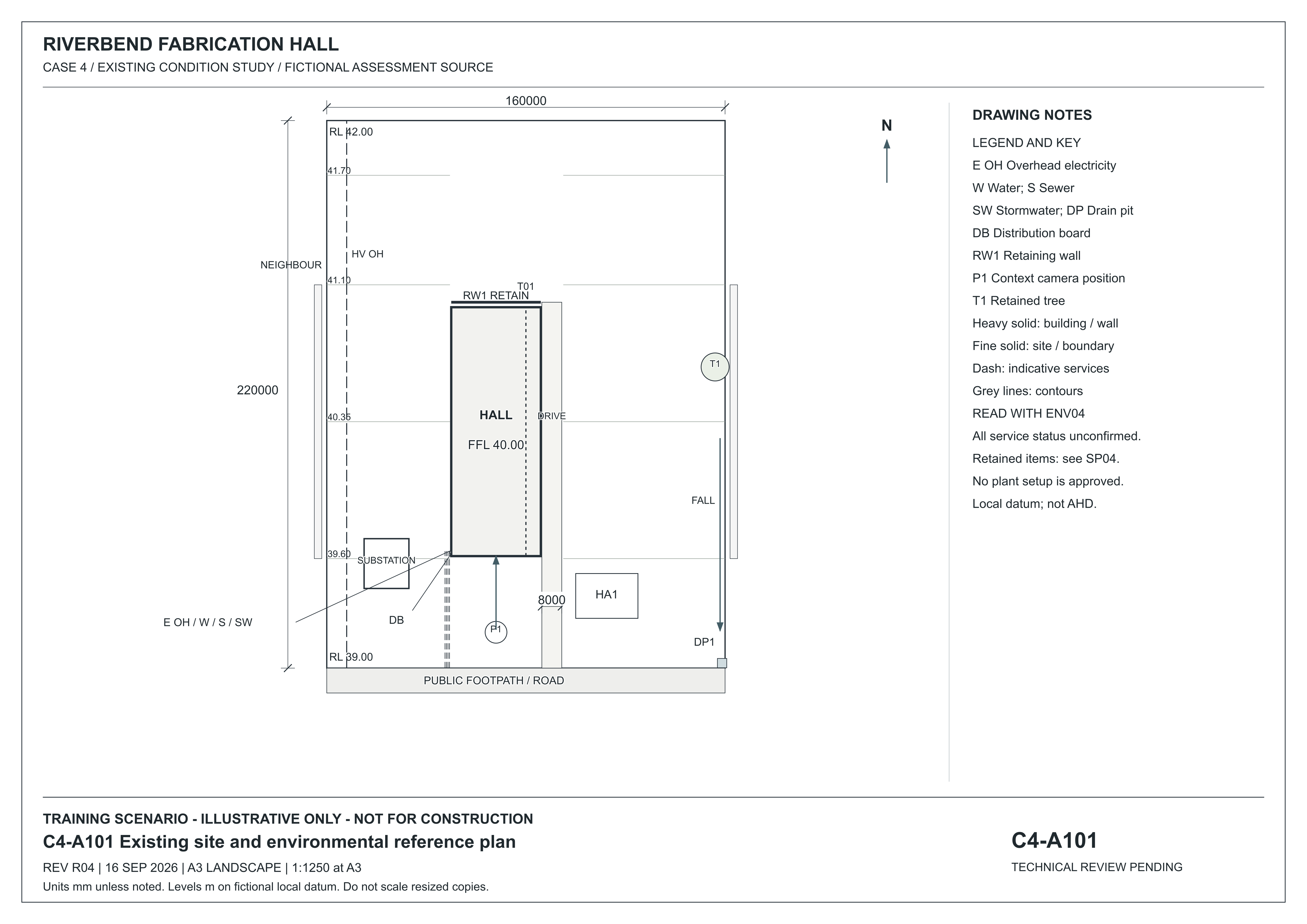
Keep this C4 project separate from Banksia C1. Riverbend uses SP04 and ENV04. Its site north arrow points up; the floor plan S201 rotates the presentation. Service status and capacity remain unconfirmed.
Existing-condition drawing for a fictional training project, R04, 16 September 2026. Not for construction. Use written dimensions; do not scale a resized screen image. Open the full-size drawing to read the title block and legend.
Riverbend · rotated floor plan and grids
Use the north arrow instead of assuming page top is north.
 Open full-size illustration
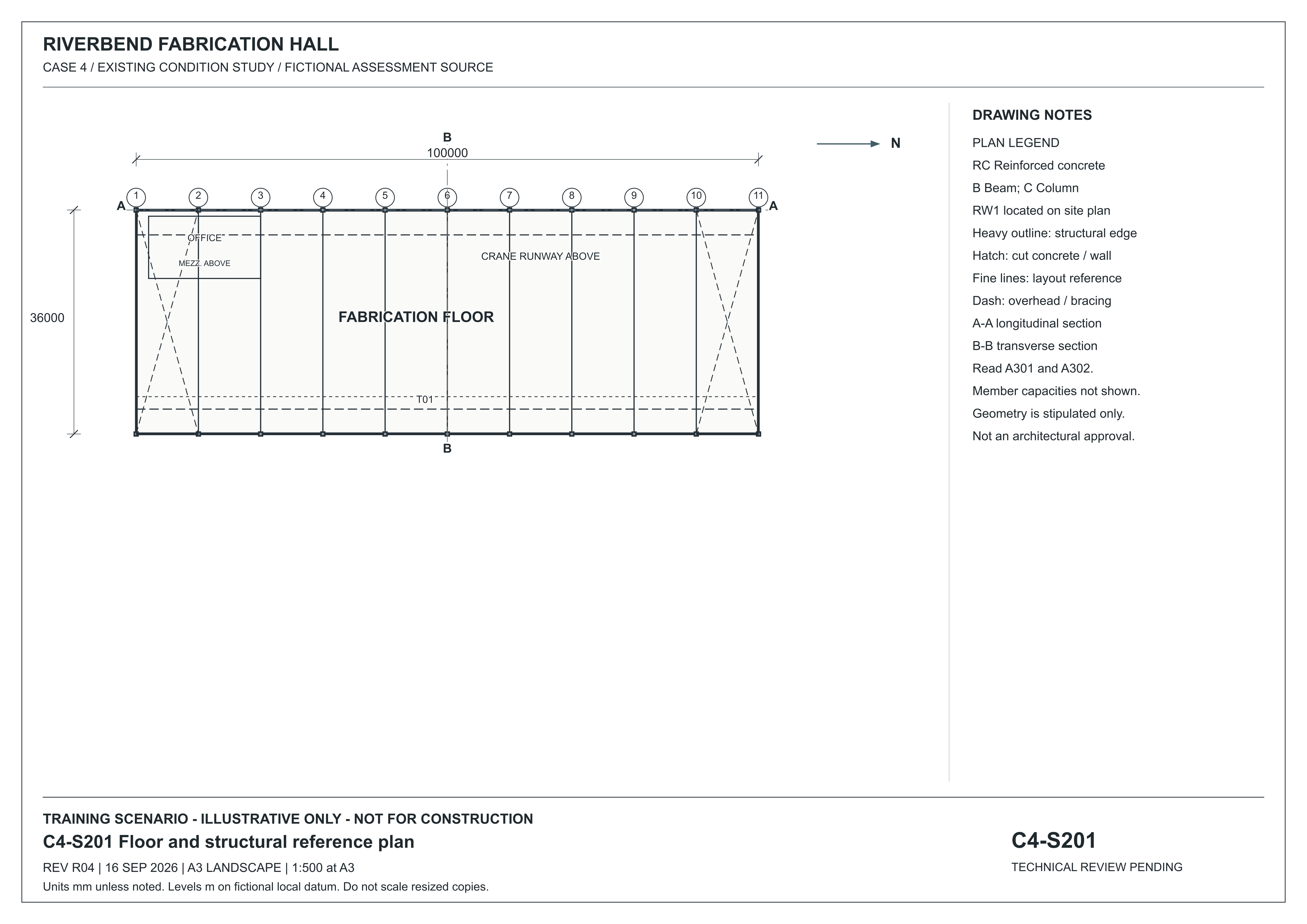
Here dashed lines mean overhead or bracing according to this legend. RC means reinforced concrete, B beam and C column. A–A and B–B refer to A301 and A302. The geometry is stipulated; the drawing gives no member capacities.
Existing-condition drawing for a fictional training project, R04, 16 September 2026. Not for construction. Use written dimensions; do not scale a resized screen image. Open the full-size drawing to read the title block and legend.