
Read a complete project
Read a complete project
Use the supplied BP-01 proposed construction project and its coordinated plans, drawings and specifications. Start with the issue register and check the project identity, sheet list and revisions. Read construction and engineering information together with the cross-sections, structural details, dimensions, notes, site plan and specifications. Check that every document belongs to the same project and current issue.
Build a project brief showing the construction type, nominated locations and dimensions, materials, environmental controls, standards of work, finishes and tolerances. For each requirement, cite the sheet, revision, detail or specification clause that supports it. Identify unresolved references and report inconsistencies through the project's process.
Your assessor also needs evidence of performing the site-related tasks in a workplace or a close simulation that reproduces construction conditions, materials, activities, responsibilities and procedures. Arrange the task and supervision before entering the area. Select and use the required PPE, orientate the site plan, and locate the nominated boundaries, features and services using the required procedures.
Submit the project records requested by your assessor. A written account or photograph by itself does not establish that a practical task was performed satisfactorily. The assessor records what they observe, asks any necessary questions and decides whether the evidence is sufficient. Missing project documents or an unarranged practical activity must be resolved before assessment is finalised.
 Open full-size illustration
About this illustration and its limits
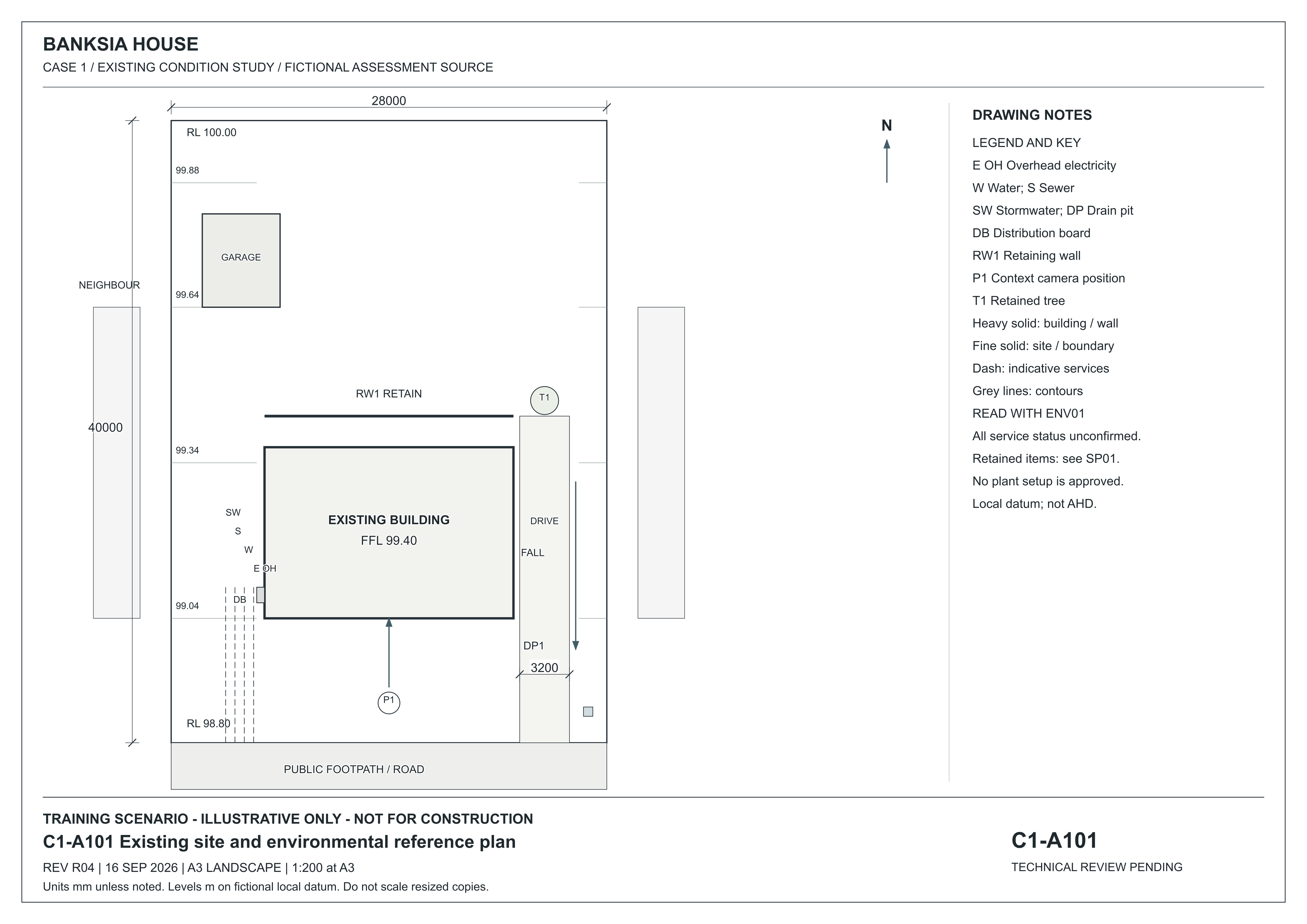
A101 places the main building and detached garage inside the lot. DP1 is a drain pit at the low southern frontage; T1 is the eastern retained tree and RW1 the rear garden wall. The legend identifies DB as distribution board and the service line abbreviations. Services are indicative and unconfirmed. Read ENV01 for environmental instructions and SP01 for project requirements.
Existing-condition drawing for a fictional training project, R04, 16 September 2026. Not for construction. Use written dimensions; do not scale a resized screen image. Open the full-size drawing to read the title block and legend.
Source: Onshift · Banksia and Riverbend teaching drawings and initial records
 Open full-size illustration
About this illustration and its limits
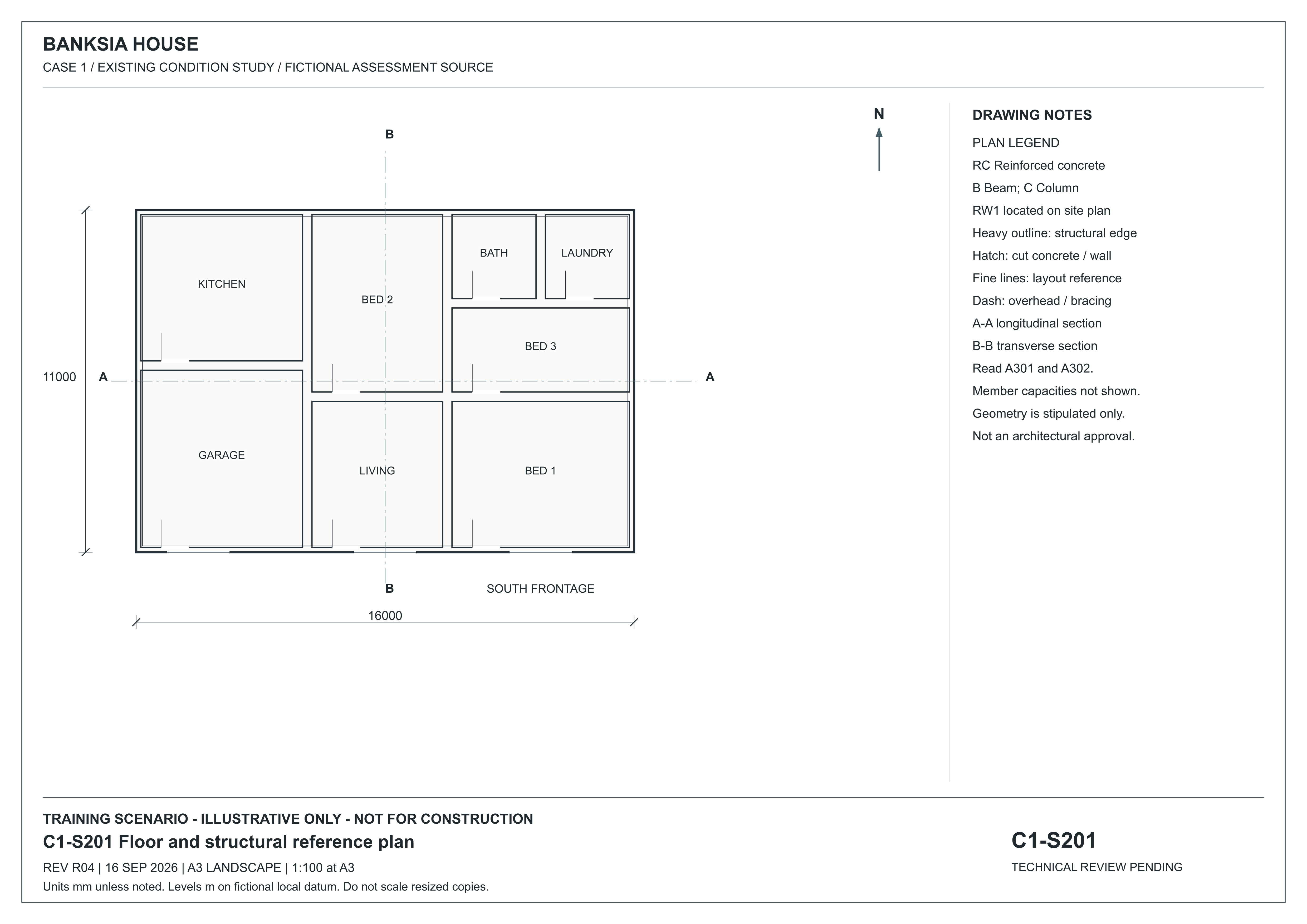
S201 shows the room arrangement and the written overall dimensions. Its A–A reference leads to A301 along the 16000 millimetre length; B–B leads to A302 across the 11000 millimetre width. It does not provide member capacities or connection design.
Existing-condition drawing for a fictional training project, R04, 16 September 2026. Not for construction. Use written dimensions; do not scale a resized screen image. Open the full-size drawing to read the title block and legend.
Source: Onshift · Banksia and Riverbend teaching drawings and initial records
Bring the evidence together
Explain the three assessment components and the difference between practice sources and the assessed project.
Open the BP-01 proposed-project pack and learner workbook
Study the drawing
Locate a feature on the full sheet, then read its enlarged detail.
C1-A101 — revision R04 · 16 September 2026
Fictional existing-condition drawing. Not for construction. Dimensions are in millimetres unless noted; levels are in metres on a fictional local datum. Use written dimensions, not screen measurements.
The numbered markers point to features on the full sheet. Hover or focus a marker to locate it. Tap, click or press Enter to open its explanation and enlarged detail. The named buttons above do the same thing.
Choose a numbered marker or a named feature to locate it on the sheet.
Open original full-size C1-A101 R04
Read the sheet in text
A101 places the main building and detached garage inside the lot. DP1 is a drain pit at the low southern frontage; T1 is the eastern retained tree and RW1 the rear garden wall. The legend identifies DB as distribution board and the service line abbreviations. Services are indicative and unconfirmed. Read ENV01 for environmental instructions and SP01 for project requirements.
Read a proposed building
SO01 adds a small proposed site office to the fictional BP-01 yard. Follow the same building through its plans, elevations, section and schedules.
Fictional teaching supplement · R01, 17 October 2026. Use the edition assigned by your assessor. BP-01 remains the assessed path project; these sources do not add a new practical task or authorise construction.
SO-A101 — Proposed site-office location · A3 at 1:100
Use the site plan to locate the proposed office in relation to boundaries, the path and retained yard features.
The numbered markers point to features on the full sheet. Hover or focus a marker to locate it. Tap, click or press Enter to open its explanation and enlarged detail. The named buttons above do the same thing.
Choose a numbered marker or a named feature to locate it on the sheet.
Open SO-A101 with complete text equivalent · Open original full-size SO-A101
Reading limit: A plotted position does not establish service clearance, a usable entrance or permission to build.
Door, window and finish schedules · Specification · Issue register
Download all four A3 drawings (PDF) · Study guide and worked examples
Narrated lesson
AI narration · transcript available. Pause to inspect the drawing when prompted. Your listening position is saved on this device; it is not assessment evidence.
Read the lesson transcript
You have practised choosing a view, following references, checking revisions and describing requirements. The next step is to apply those skills to one coordinated proposed construction project. The assessment has three components: eight structured knowledge questions, a project portfolio and brief, and an observed site-plan activity. The portfolio records the documents used, their revisions, the requirements you read and the discrepancy you reported. The practical activity involves selecting and using the required protective equipment, orientating the plan and locating the nominated site references in an arranged work area. Your assessor records what you actually do and may ask you to explain your own work. Existing-condition drawings describe what is already there. Use the B P zero one proposed-work pack for your assessment. Check the issued resources and arrangements before you begin. If feedback identifies a gap, use it to prepare a further attempt; your earlier submission remains part of the record.
Audio guide: From your first saved answer to an assessor decision
AI narration with a matching transcript. Your listening position is saved on this device; listening is not assessment evidence.
Read the audio guide transcript
Begin with the course entry check. Before assessed work starts, Matthew Hardy must verify your prerequisite evidence for C P C C W H S two zero zero one. Use the Matthew Hardy contact link shown in the course to arrange that review. Ask how to provide your Statement of Attainment or U S I transcript. Do not send your login details. A white card alone does not establish completion of that unit.
Work in your activated learner record. The public preview and practice response boxes do not save assessment answers. In the learner record, write your own answer and wait for the saved confirmation before leaving. If saving fails, keep the page open and follow the recovery message. A saved draft is available for you to continue. It has not been sent to an assessor. Checking an answer provides learning support; it does not make a competency decision.
For the project portfolio, read the issued project pack and send your own request for clarification through the task's arrangements area. An R F I is a request for information. Identify the sources and the information you need. Wait for the assessor's recorded response, then retain and use it in your project record. A request alone does not complete this stage.
For the observed task, request a practical booking. Wait for the issued time, location, contact, personal protective equipment and entry briefing before attending. The assessor observes your actions and records the required evidence. An online explanation does not replace that practical activity.
When the task's required arrangements and evidence are complete, use Send to assessor and wait for confirmation. Read the published feedback. If another attempt is required, your assessor must explicitly release it before you can send revised work. Follow the feedback and any new arrangements. Earlier submitted attempts remain in the record.
A human assessor considers the combined evidence and records the final unit decision. If you are deemed competent and the required identity, fee, award and issuing checks are satisfied, authorised staff can issue a Statement of Attainment. Completing lessons or pressing submit does not issue that document.
Find it in the source
Review the labels on the teaching sheets, then read the project and practical task instructions below.
Try it yourself
What must your assessed project pack and practical session provide that these existing-condition teaching images cannot establish?
Practice only. Your notes clear when you change topics or leave this page. They are not saved or submitted as assessment evidence.
Read a complete project
Use the reading above, then apply it to the situation and task below.
Interpret the supplied project set
Work within the authority and safety arrangements for your role.
Use the BP-01 Banksia Practice Yard proposed pedestrian path pack and its learner workbook. This is a separate fictional proposed-project exercise; the C1 and C4 existing-condition teaching drawings are not its site survey.
Interpret the supplied project set
Situation
Use the BP-01 Banksia Practice Yard proposed pedestrian path pack and its learner workbook. This is a separate fictional proposed-project exercise; the C1 and C4 existing-condition teaching drawings are not its site survey.
Use your own evidence. Check Assessment arrangements for the required exchange or practical session before you finalise this task.
The task
Interpret the BP-01 proposed project using the documents below. Prepare your own source register, annotated extracts, requirements schedule, clarification record and project brief. Use the blank learner workbook or an equivalent document. Your assessor reviews your interpretation and asks verification questions.
- Check BP-IR01, then record each source identifier, revision, date and issue status in your source register.
- Annotate extracts from BP-A101, BP-S201, BP-S202 and BP-ENV101 to show the locations, symbols, references and controls you relied on. Retain each extract's sheet identity and revision. Explain the purpose of these drawings and BP-SP01.
- Prepare a requirements schedule covering construction type, dimensions and locations, materials, environmental controls and locations, workmanship, finishes and tolerances. Cite the sheet/revision, detail or specification clause for each reading.
- Compare BP-BN01 R00 with the issued sources. Use Assessment arrangements to submit your own request for information, citing both sources and explaining the effect on the task. Wait for the authorised response; do not guess it or submit a final portfolio while it is outstanding.
- Retain the actual response with its author, date and reference, then update your source register and project brief. Identify any unresolved limits and explain how the clarification affects the proposed work.
- Complete the answer boxes below, export your portfolio to PDF or a document, attach it to this task and check the saved/uploaded confirmation before selecting Send to assessor. Keep your own copy.
Documents for this task
These are the BP-01 assessment sources. Keep their project identity and revisions separate from the C1 and C4 existing-condition teaching drawings. Read the issue register before recording which documents you used.
- BP-01 · Complete project pack
Open the coordinated document list.
- BP-IR01 · Issue register
Check document identity, revision and status.
- BP-A101 · Site plan
Read locations, the legend and site references.
- BP-S201 · Path plan
Read the proposed construction and section references.
- BP-S202 · Sections and detail
Read the cross-sections, profile and construction detail.
- BP-ENV101 · Environmental plan
Read controls, locations and affected activities.
- BP-SP01 · Project specification
Read materials, workmanship, finishes and tolerances.
- BP-WI01 · Work instructions
Check the task, responsibilities and reporting process.
- BP-BN01 R00 · Earlier briefing note
Compare this retained note with the issued sources.
- BP-LR01 · Blank portfolio workbook
Use its headings to prepare your own portfolio, or use an equivalent document.
Each drawing page includes a text equivalent and a full-size drawing. Use its written dimensions; do not measure a resized screen image.
The optional workbook saves a draft only on this browser and device. Export a copy and attach your completed portfolio to this task. The workbook does not send answers to your assessor.
PDF, image or document Attachments stay private to you and your assessor.
Preview only — disabled.
Help with this answer (optional)
Record identifiers, sheets, revisions, issue status and specification references.
Check my answer (preview only — disabled). Show example layout
Synthetic example — layout demonstration only. Not AI output, not stored, not evidence.
What is clear
- Example layout only: the response identifies the project records being compared.
What to develop
- Example layout only: explain how you establish the authorised issue and report the inconsistency.
A question to think about
Which record would confirm the current authorised issue?
Read more in the Field Book
Teaching feedback only. It is not a mark or a result; your assessor decides the outcome.
Help with this answer (optional)
Include construction type, dimensions/locations, environmental controls, workmanship, finishes, tolerances and materials.
Check my answer (preview only — disabled). Show example layout
Synthetic example — layout demonstration only. Not AI output, not stored, not evidence.
What is clear
- Example layout only: the response identifies the project records being compared.
What to develop
- Example layout only: explain how you establish the authorised issue and report the inconsistency.
A question to think about
Which record would confirm the current authorised issue?
Read more in the Field Book
Teaching feedback only. It is not a mark or a result; your assessor decides the outcome.
Help with this answer (optional)
Identify the controlled discrepancy in the supplied project pack, cite both conflicting sources and record your clarification request and the authorised response. Do not resolve it by guessing or saying none were found.
Check my answer (preview only — disabled). Show example layout
Synthetic example — layout demonstration only. Not AI output, not stored, not evidence.
What is clear
- Example layout only: the response identifies the project records being compared.
What to develop
- Example layout only: explain how you establish the authorised issue and report the inconsistency.
A question to think about
Which record would confirm the current authorised issue?
Read more in the Field Book
Teaching feedback only. It is not a mark or a result; your assessor decides the outcome.
Optional help and learning for this task
Preview only — disabled. A learner sends from the evidence page.
What to submit
Your own response and the requested project records.
Use the plan in the work area
Work within the authority and safety arrangements for your role.
Your assessor arranges a workplace or close simulation and confirms its entry, safety and observation arrangements.
Use the plan in the work area
Situation
Your assessor arranges a workplace or close simulation and confirms its entry, safety and observation arrangements.
Use your own evidence. Check Assessment arrangements for the required exchange or practical session before you finalise this task.
The task
Under the agreed supervision, select and use the required PPE, orientate the site plan with the work area and locate the nominated services, key features and boundaries. Follow site procedures and report discrepancies. The assessor records direct observation and any clarifying questions. Your written reflection and attachments support that record; they do not replace it.
- Open Assessment arrangements and request or confirm your practical session. Read the issued briefing for the place and time, assessor/supervisor, current plan, entry requirements, final PPE and safe references to locate. If any arrangement is missing, use the contact in that panel before attending.
- At the arranged session, follow the supervisor's entry and safety instructions. Select and use the required PPE, orientate the issued plan and demonstrate locating the nominated references from safe access while the assessor observes.
- Report missing markers, differences or unsafe conditions and follow the supervisor's instruction. A service symbol does not establish depth or isolation. Do not excavate, disturb services or invent a site reading.
- Record the actual session and what you demonstrated in the boxes below, check the saved confirmation and send your response to the assessor. Attach additional supporting records if your assessor requests them. The assessor completes the separate observation record and decides the result.
Documents for this task
Read the sources below to prepare. Your Assessment arrangements panel supplies the actual practical briefing. Check its place, time, assessor, issued plan and safety instructions before attending; a draft project pack does not authorise site entry.
- BP-A101 · Site plan and text equivalent
Prepare to relate the nominated plan to the arranged work area.
- BP-WI01 · Entry and PPE preparation
Read the proposed precautions, then follow the final briefing for your session.
- BP-WI01 · Orientation and references
Read the observation actions and service-information limits.
- BP-WI01 · Differences and safety
Check what to do if the plan, work area or instructions disagree.
- BP-LR01 · Practical preparation
Prepare the supporting record; the assessor records actual observation separately.
Each drawing page includes a text equivalent and a full-size drawing. Use its written dimensions; do not measure a resized screen image.
PDF, image or document Attachments stay private to you and your assessor.
Preview only — disabled.
Help with this answer (optional)
Identify the task/date, plan revision, supervisor/assessor and entry/PPE requirements.
Check my answer (preview only — disabled). Show example layout
Synthetic example — layout demonstration only. Not AI output, not stored, not evidence.
What is clear
- Example layout only: the response identifies the project records being compared.
What to develop
- Example layout only: explain how you establish the authorised issue and report the inconsistency.
A question to think about
Which record would confirm the current authorised issue?
Read more in the Field Book
Teaching feedback only. It is not a mark or a result; your assessor decides the outcome.
Help with this answer (optional)
Record the references used and any unresolved differences. The assessor verifies actual performance.
Check my answer (preview only — disabled). Show example layout
Synthetic example — layout demonstration only. Not AI output, not stored, not evidence.
What is clear
- Example layout only: the response identifies the project records being compared.
What to develop
- Example layout only: explain how you establish the authorised issue and report the inconsistency.
A question to think about
Which record would confirm the current authorised issue?
Read more in the Field Book
Teaching feedback only. It is not a mark or a result; your assessor decides the outcome.
Optional help and learning for this task
Preview only — disabled. A learner sends from the evidence page.
What to submit
Your own session response and the assessor's recorded observation. Attach additional supporting records if requested.